class: center, middle, inverse, title-slide # A Reproducible Data Analysis Workflow with R Markdown, Git, Make, and Docker ### Andreas M. Brandmaier ### 2020-12-15 --- class: clear  --- class: center # Replication ≠ Reproduction <br><br> ## Replicability: ### Same conclusion from same analysis and new data <br><br> -- ## Reproducibility: ### Same conclusion from same analysis and same data --- class: clear middle center large ## Your closest collaborator is you six months ago, but you don’t reply to emails. .footnote[From Karl Broman's lecture on reproducibility, paraphrasing Mark Holden] --- # Reproducibility is hard! - Hardwicke et al. (2018): Out of 35 articles in _Cognition_, 22 could be reproduced but 11 of those required authors' assistance. For 13 articles, at least one outcome could not be reproduced even with the original authors' assistance. -- - Obels et al. (2020) show that in 62 Registered Reports, 41 had data available, 37 had analysis scripts available. The authors could run 31 of the scripts and reproduced 21 articles (within reasonable amount of time) .footnote[https://doi.org/10.1098/rsos.180448 and https://doi.org/10.1177%2F2515245920918872] --- # Sources of Failure to Reproduce Results .pull-right[  ] 1. *Multiple versions of scripts/data* (e.g., dataset has changed over, i.e., was further cleaned or extended) -- 2. *Multiple scripts* in a pipeline; unclear which scripts should be executed in which order -- 3. *Copy&paste errors* (e.g., inconsistency between reported result and reproduced result) -- 4. Broken *software dependencies* (e.g., analysis broken after update, missing package) --- # Four Elements of Reproducibility <center> <img src="images/nutshell.svg" width="90%" /> </center> .footnote[from Peikert and Brandmaier (2020)] --- class: left, middle, inverse background-image: url(http://3.bp.blogspot.com/-c7bI_n5oXd0/U7vTYArmRoI/AAAAAAAAKoQ/3JkxLM2PRKo/s1600/gospels-meme.jpg) background-position: right <!-- ----------------------------- Part: Version Control --------------------------------- --> # Version Control --- # Version Control ### Version Control .pull-left[ - Version control systems (VCS) such as `git` record changes to a set of files over time so that you can restore specific versions later. - VCS guarantee that code and data are exactly the same version as used for publication. - Reduces the number of dead or dysfunctional code lines (deletion is safe and branches help separate productive and experimental code) ] .pull-right[ 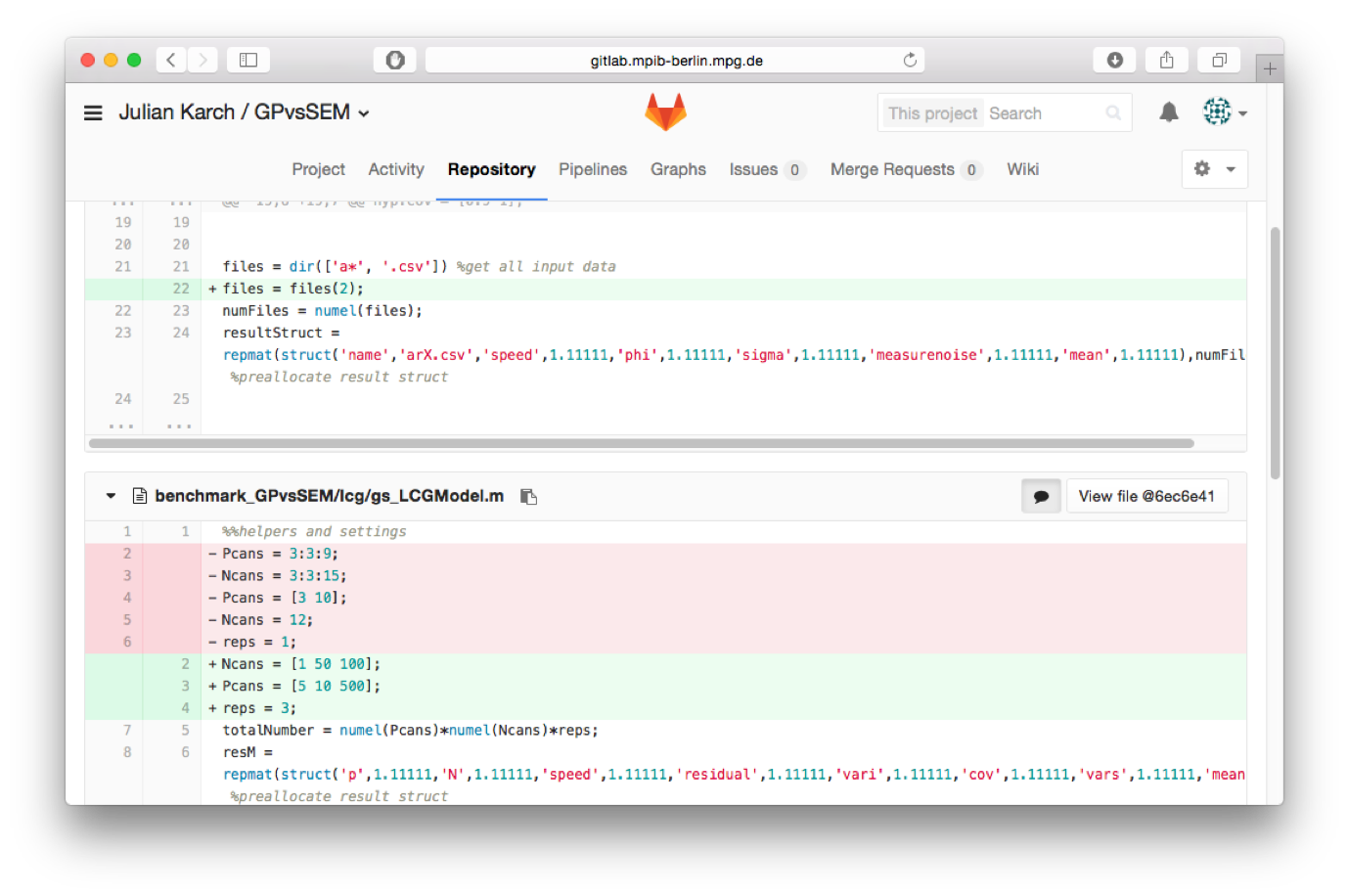 ] --- # Issues  --- # Issues  --- # Issues  --- background-image: url(images/screenshot_github_releases.png) background-size: contain # Releases on github.com --- # Long-Term Storage - GitHub has no long-term guarantees for the availability of its service -- - (even though they do LOCKSS, for Lots Of Copies Keeps Stuff Safe, e.g., the Artic World Archive) -- - Mirror snapshots with meta-data and DOI to other providers (e.g., Zenodo, FigShare, OSF) - This helps making the repository (F)indable (as in FAIR) --- background-image: url(images/claudio-schwarz-purzlbaum-qjX0QBtDXto-unsplash.jpg) background-size: cover background-position: right top class: left, middle, inverse, clear # <br><br><br><br><br>Dependency Management --- background-image: url(https://www.gnu.org/graphics/empowered-by-gnu.svg) background-size: 20% 38% background-position: right top # GNU Make ### Challenge .pull-left[ Once someone found our files... which of those files are executable and in which order are they to be executed? ] --- # Solution: Make ## A Makefile - contains a number of recipes - Each recipe contains its ingredients (=dependencies) and commands to create the product - There is a default recipe (defined entry point) - By convention, there is an „all“ recipe to create everything - Recipes can depend on other recipes and files --- # Make ## Why Make? - A single, well-defined entry point for your analysis (default target): `make` - Management of all external dependencies in one file via (dependend) targets, such as - Installing extra software - Starting external programs (such as pre-processing pipelines) - Downloading data from external repositories --- # Example Makefile ### Makefile Schema ```bash recipe name: ingredients instructions ``` -- ### An example Makefile ```bash all: manuscript.pdf manuscript.pdf: data/iris_prepped.csv manuscript.Rmd Rscript -e 'rmarkdown::render("manuscript.Rmd")' data/iris_prepped.csv: R/prepare_data.R data/iris.csv Rscript -e 'source("R/prepare_data.R")' ``` --- class: left, middle, inverse background-image: url(https://www.docker.com/sites/default/files/d8/2019-07/horizontal-logo-monochromatic-white.png) background-position: right <!-- ----------------------------- Containerization --------------------------------- --> # Containerization --- background-image: url(https://www.docker.com/sites/default/files/d8/2019-07/Docker-Logo-White-RGB_Vertical.png) background-position: top, right background-size: 50% 50% # Docker A Docker container is like a shareable virtual machine that runs identically on any computer (Linux, macOS, Windows) - You can either provide a short recipe how to create a container (few kilobytes) or - the entire container (few gigabytes) --- # Docker Recipes Recipes are instructions how to create a container from publicly available sources, e.g., - Rocker project (Boettiger & Eddelbuettel, 2017), with pre-configured Debian images including R/Rstudio <p style="color:white">- Microsoft R Application Network (MRAN) providing CRAN snapshots in their „time machine“</p> ```bash *FROM rocker/verse:3.6.1 ARG BUILD_DATE=2019-11-11 RUN install2.r --error --skipinstalled here lavaan WORKDIR /home/rstudio ``` --- # Docker Recipes Recipes are instructions how to create a container from publicly available sources, e.g., - Rocker project (Boettiger & Eddelbuettel, 2017), with pre-configured Debian images including R/Rstudio - Microsoft R Application Network (MRAN) providing CRAN snapshots in their „time machine“ ```bash FROM rocker/verse:3.6.1 ARG BUILD_DATE=2019-11-11 *RUN install2.r --error --skipinstalled here lavaan WORKDIR /home/rstudio ``` --- # The easy way - The R package `renv` helps you to set up and restore project-specific local environments in R - Create a private R library with `renv::init()` (the project will now always rely on the local library) - Update a library with `renv::snapshot()` - Restore a library with `renv::restore()` .footnote[cf. the WORCS approach by van Lissa et al. (2020)] ### But is this really enough? --- # Examples of Non-Reproducible Code in R Here are some examples of non-reproducible code that cannot be captured easily from within a given R environment ### 1. Bugfix in random number generator in R between R 3.5 and R 3.6 ```r set.seed(1234); sample(1:10, 5) ``` -- ```r 2 6 5 8 9 (R3.5) ``` -- ```r 10 6 5 4 1 (R3.6.1) ``` --- # Examples of Non-Reproducible Code in R Confidence intervals (95%) of a simple regression coefficient estimate (with identical random seed): .pull-left[ ```r [1] "R version 3.5.0 (2018-04-23)" 2.5 % 97.5 % 0.0097 0.3842 ``` ] -- .pull-right[ ```r [1] "R version 3.6.1 (2019-07-05)" 2.5 % 97.5 % -0.0005 0.3748 ``` ] .footnote[Note that the results are not reproduced but replicated.] --- # Examples of Non-Reproducible Code in R ### 2. Locale-dependent behavior (e.g., English vs Lithuania): ```r sort(state.abb) [1] "AK" "AL" "AR" "AZ" "CA" "CO" "CT" "DE" "FL" "GA" "HI" "IA" [13] "ID" "IL" "IN" "KY" "KS" "LA" "MA" "MD" "ME" "MI" "MN" "MO" [25] "MS" "MT" "NC" "ND" "NE" "NH" "NY" "NJ" "NM" "NV" "OH" "OK" [37] "OR" "PA" "RI" "SC" "SD" "TN" "TX" "UT" "VA" "VT" "WA" "WI" [49] "WY" "WV" ``` --- # Containers ### Docker containers - guarantee identical execution of its contents across platforms (and time) including cloud computing -- - can run interactively: R/Rstudio can run in the container (i.e., there is no need to ever run the analysis in your local computing environment) -- - Analyses can be run in different containers (simulating different package versions) to find out what downstream updates broke your code / your results --- class: left, middle, clear background-image: url(images/neven-krcmarek-V4EOZj7g1gw-unsplash.jpg) background-position: right middle background-size: cover <!-- ----------------------------- Part: Dynamic Document Generation --------------------------------- --> # <br><br><br><br><br>Dynamic Document<br>Generation --- # R Markdown Example .pull-left[ 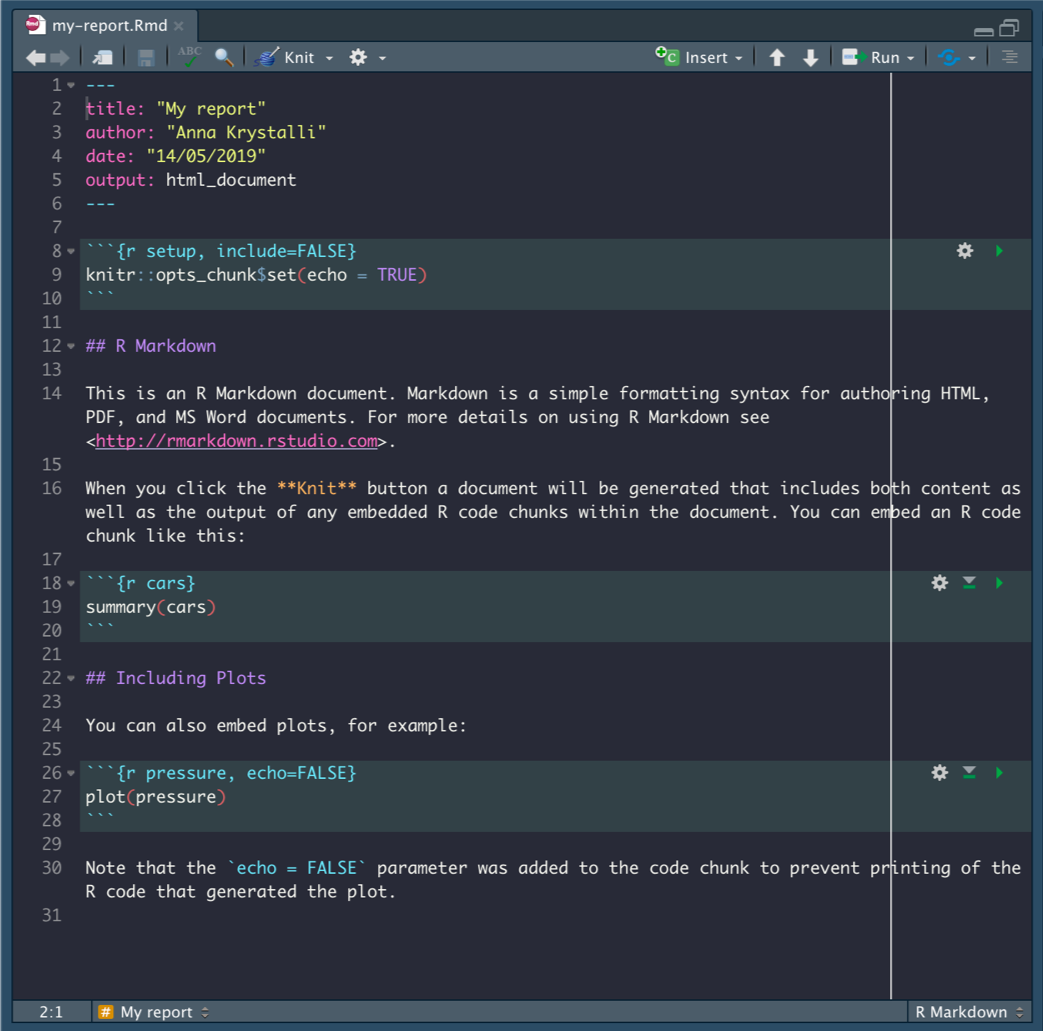 ] ..pull-right[ 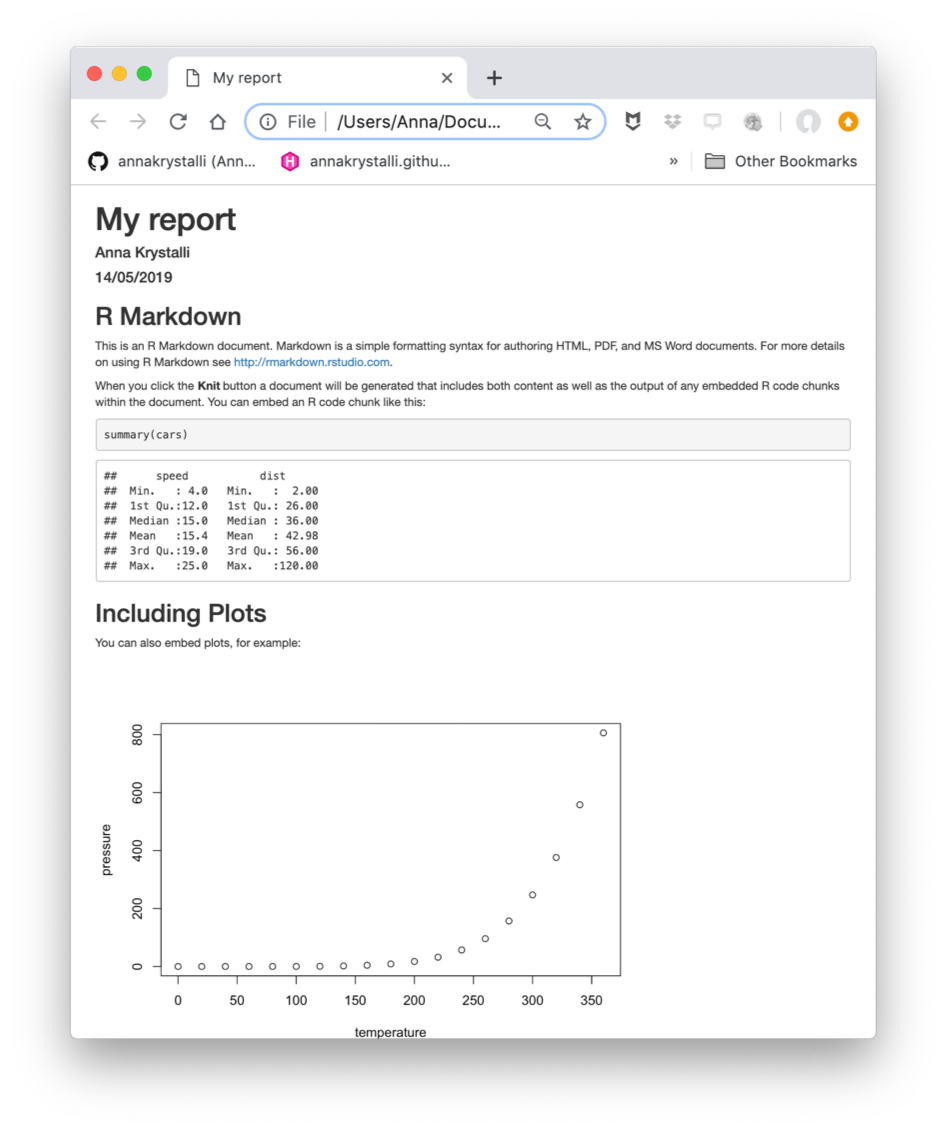 ] --- # Number reporting (APA style) with papaja .pull-left[ 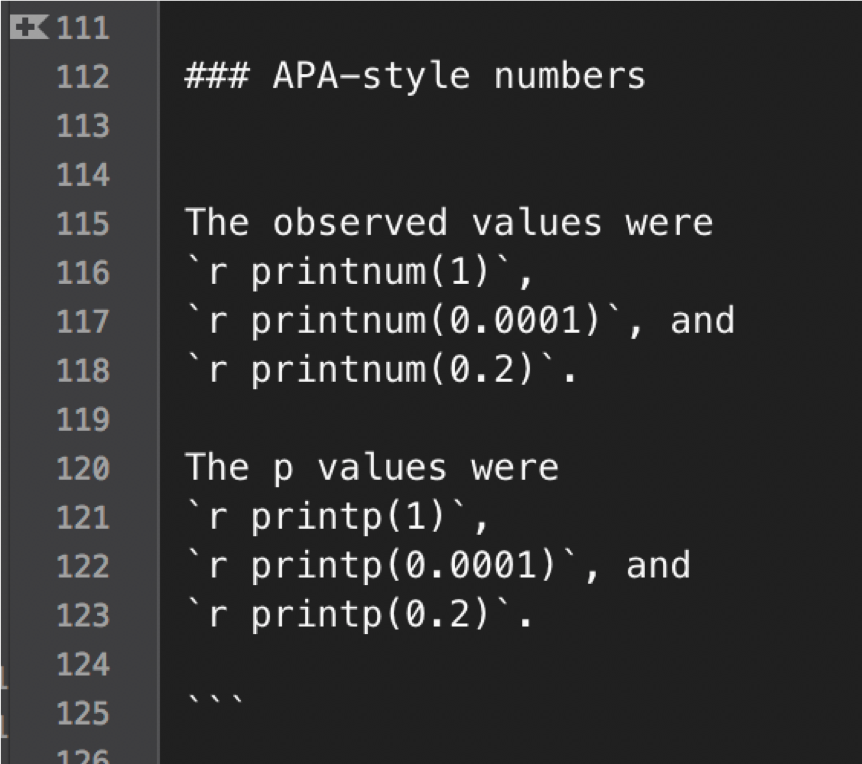 ] .pull-right[ 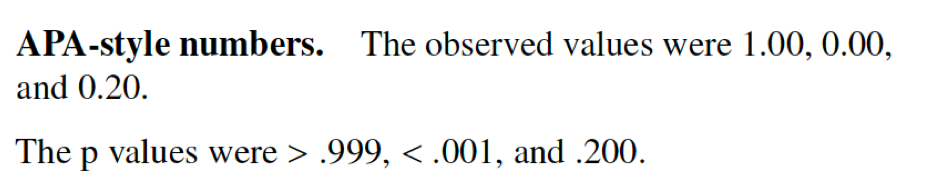 ] --- # Reporting statistics with papaja .pull-left[ 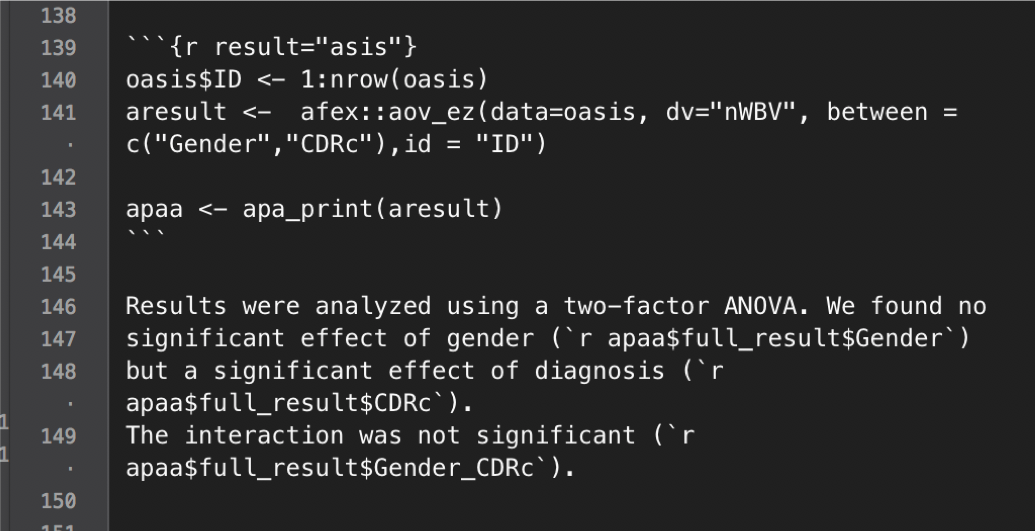] .pull-right[ 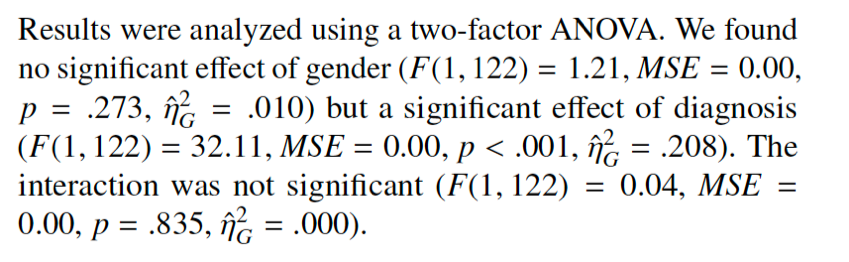] --- class: clear middle inverse # The repro package --- # YAML header (R Markdown) A standard YAML header: ```r --- title: My worst academic fails author: Andreas Brandmaier date: 2020-11-17 output: html_document --- ``` --- # YAML header (repro) `repro` extends the YAML header of R Markdown to track dependencies on code and data. ```r --- title: My worst academic fails author: Andreas Brandmaier date: 2020-11-17 repro: packages: - usethis - fs - aaronpeikert/repro@d09def75df scripts: - R/clean.R data: mycars: data/mtcars.csv output: html_document --- ``` --- # System setup with repro Load the package: ```r library(repro) ``` Run some checks: ```r check_git() ``` ``` ## ✓ Git is installed, don't worry. ``` ```r check_make() ``` ``` ## ✓ Make is installed, don't worry. ``` ```r check_docker() ``` ``` ## ✓ Docker is installed, don't worry. ``` --- # Project setup with `repro` - Use `repro::automate()` to make an existing analysis reproducible - creates a Dockerfile & Makefile based on every RMarkdown in the project folder - use `automate_load_packages()` to load all packages in your script, `automate_load_data`() for data, and `automate_load_scripts()` to attach external scripts --- # Reproduction To reproduce a project completely inside a container: ```r library(repro) rerun() ``` ``` ## ● To reproduce this project, run the following code in a terminal: ``` ``` ## make docker && ## make -B DOCKER=TRUE ``` --- # Outlook ## Long-term sustainability is a continuing challenge for the community - Reproducibility is hard - It's still a long way to go - Even just adding some of the proposed components help to increase the chances of future reproducibility of your code --- # Thank you! If you want to know more: - Ask us a question via a [github issue](https://github.com/aaronpeikert/repro/issues) - Follow [@brandmaier](https://twitter.com/brandmaier) on twitter - Read our [preprint](https://psyarxiv.com/8xzqy/) - Contribute to our [repro](https://github.com/aaronpeikert/repro) repository on GitHub - Read Aaron's [slides on repro](https://github.com/aaronpeikert/repro-talk) --- # License Information - This presentation is distributed under CC-BY 4.0 - The ananas image on the title and other unsplash images were provided under the Unsplash License. - The GNU logo was provided under the Free Art License.